
GoMeddo Payments is a Salesforce package that connects Salesforce to one of our Supported Payment Service Providers (PSP).
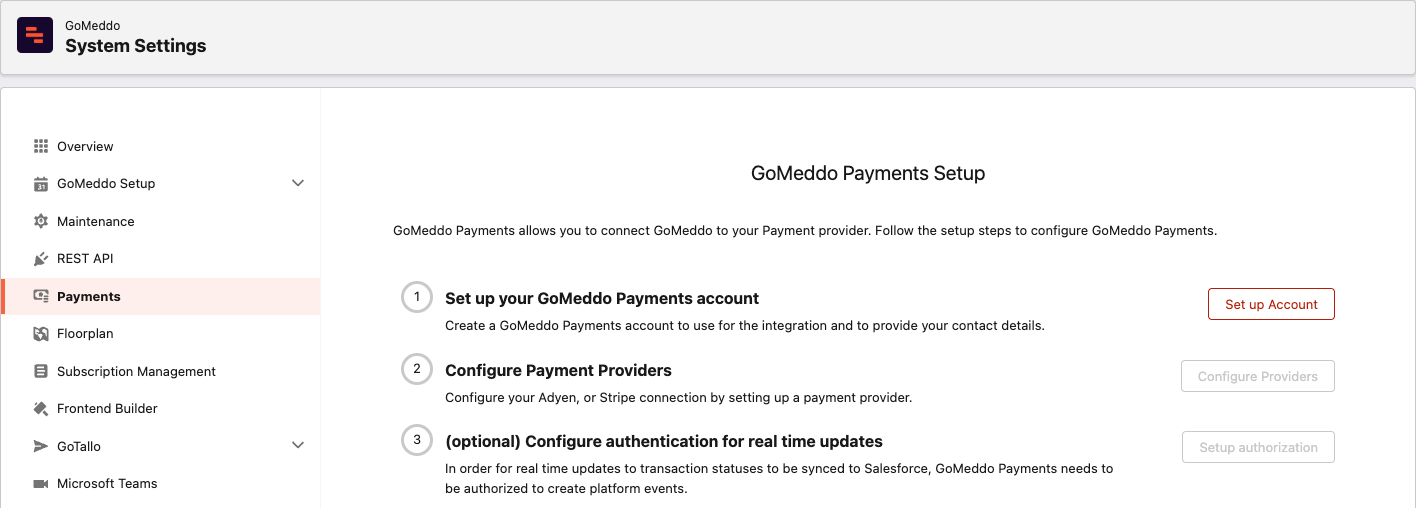
After you install the package, set it up in the GoMeddo app under GoMeddo Settings > Payments:
-
Click Set up Account, fill in Account Name, Support Name, and Contact Method, and click Create GoMeddo Payments Account.
-
Click Configure Providers, then Add Provider, and enter the details of your Adyen or Stripe account.
-
Optional: click Setup authorization so transaction status updates reach Salesforce in real time.
GoMeddo Payments then sets up the connection to your provider automatically, including the webhook that sends payment updates back. To set it up, you need the GoMeddo Payments Admin permission set.
You can use GoMeddo Payments together with GoMeddo to create payment links from a flow, see Generate Payment links from a flow. Users who run that flow need the GoMeddo Payments User permission set. To use GoMeddo Payments with the Widget - Overview, contact us at support@gomeddo.com.