
To use the GoMeddo Frontend Builder, you must authenticate an API user. This user is used to facilitate communication between Salesforce and the frontend component running outside of Salesforce. Using a dedicated user helps restrict data access, improves security, and makes auditing and troubleshooting easier.
Standard Salesforce user trying to go through this process, will usually end up “frozen” by Salesforce Security policies, so please make sure to follow the steps belop.
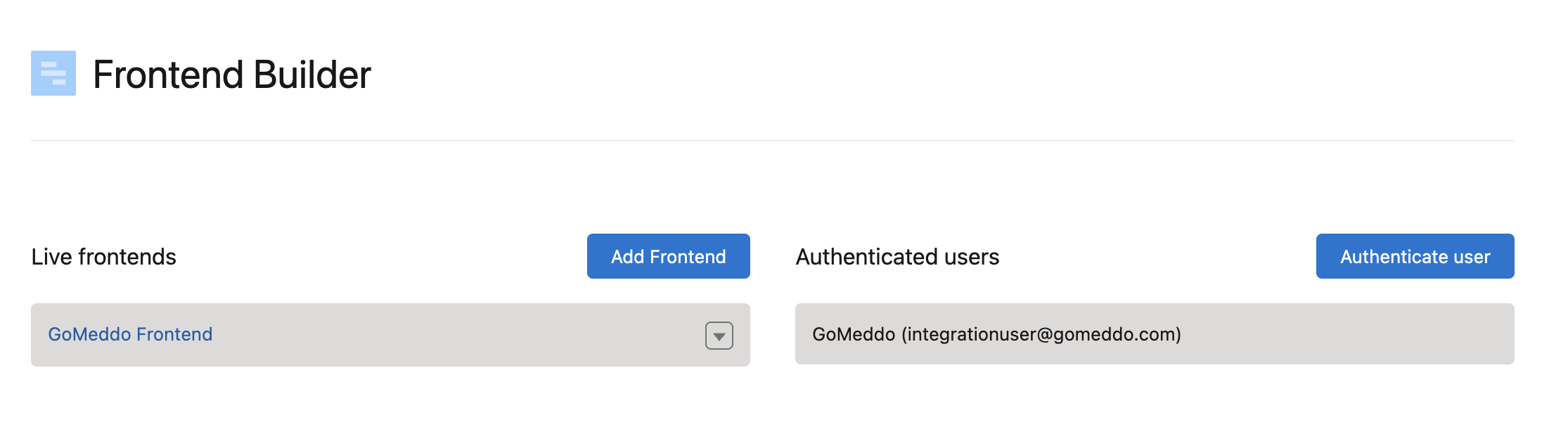
Recommended User Setup
This setup requires a dedicated integration user with:
-
A Salesforce Integration User license
-
The Salesforce API Integration permission set license
-
A valid GoMeddo package license
-
The GoMeddo Frontend Builder Integration User permission set
Steps
-
Navigate to Setup > Users
-
Click New User
-
Set the User License to Salesforce Integration, then set the Profile to Minimum Access - API Only Integrations. Select the User License first, as the Profile list depends on it.
-
Save the user
-
On the user detail page, scroll to the Permission Set License Assignments related list and click Edit Assignments
-
Enable Salesforce API Integration and save.
-
On the same page, scroll to the Permission Set Assignments related list and click Edit Assignments. Enable GoMeddo Frontend Builder Integration User and save.
-
On the same page, scroll to the Managed Packages related list and click Assign Licenses
-
Check the box in front of GoMeddo and click Add
Steps 4 and 5 must be completed in that order. If the permission set license is missing, Salesforce returns an error such as "The user license doesn't allow the permission: Read Contacts". This message refers to the user license, but the permission set license is what is actually missing.
This user cannot log in to Salesforce through a browser. This is expected, the user exists only to serve your frontends.
The GoMeddo Frontend Builder Integration User permission set contains everything the Frontend Builder needs, including the GoMeddo objects and fields it reads. You do not need to assign the GoMeddo Integration User permission set.
Assigning the GoMeddo Integration User permission set to the integration user grants considerably more than required.
|
Component |
Value |
Notes |
|---|---|---|
|
User License |
Salesforce Integration |
Selected when creating the user. Cannot be changed afterwards. |
|
Permission Set License |
Salesforce API Integration |
Unlocks what the user is allowed to be granted. Must be assigned before the permission set. |
|
Package License |
GoMeddo |
Assigned from Installed Packages. Required to use GoMeddo at all. |
|
Permission Set |
GoMeddo Frontend Builder Integration User |
Grants the actual access. |
Authentication Steps
-
Navigate to GoMeddo Settings and open Frontend Builder.
-
Click Authenticate User.
-
A pop-up window opens.
-
Click “Not you”
-
Log in with the dedicated API user and click Authorize.
-
This usually requires you to re-login with your regular user afterwards.
Once authorized, the Frontend Builder can securely communicate with Salesforce using this user's permissions.
Sharing for Sign-Up Mode
This section applies only to frontends in Sign-Up mode, where users sign up for Reservations that already exist. Frontends in Reservation mode create their own Reservations and require no additional sharing.
Permissions determine which objects and fields the integration user can access. They do not determine which records it can see — that is controlled by sharing.
Reservations are private by default, so the integration user can only see Reservations it created itself. If your frontend offers Reservations created by your staff, those records must be shared with it.
Without sharing, the frontend does not show an error. The step simply displays no available Reservations, as though none are scheduled.
Marking Reservations as bookable
Sharing rules can only filter on certain field types, and Reservation Type and Status are not among them. We recommend adding a checkbox to indicate which Reservations may be offered through a frontend.
-
Navigate to Setup, open Object Manager, and select Reservation.
-
Open Fields & Relationships and click New.
-
Choose Checkbox as the data type, set the Field Label to
Available in Frontend, and leave the Default Value as Unchecked. -
Save, and add the field to your Reservation page layout.
-
Check the field on the Reservations you want your frontend to offer.
Leaving the default unchecked means nothing is exposed to a public frontend unless it is deliberately opted in.
If your org already separates bookable Reservations by Record Type, you can use that as the sharing criterion instead and skip this field.
Creating the sharing rule
Sharing is granted to groups, not to individual users, so the integration user is placed in a public group first.
-
Navigate to Setup, open Public Groups, and click New.
-
Set the Label to
GoMeddo Frontend Builder Integration, add the integration user under Search: Users, and save. -
Navigate to Setup and open Sharing Settings.
-
Select Reservation under Manage sharing settings for.
-
In Reservation Sharing Rules, click New and configure:
|
Field |
Value |
|---|---|
|
Label |
Frontend Builder read access |
|
Rule Type |
Based on criteria |
|
Criteria |
Available in Frontend equals True |
|
Share with |
Public Groups → GoMeddo Frontend Builder Integration |
|
Reservation Access |
Read Only |
-
Save. Salesforce recalculates sharing in the background, so allow a few minutes before testing.
Additional Configuration
The GoMeddo Frontend Builder Integration User permission set covers the standard steps and the fields the Frontend Builder ships with. The following require additional access.
|
If your frontend uses |
Grant the integration user |
|---|---|
|
Payments |
Access to the GoMeddo Payments payment provider, and Read and Edit on the Transaction object including its Reservation field |
|
Additional fields in the Personal Details or Custom Fields steps |
Field access to those fields |
|
A custom object as the source of a selection step |
Read on that object and on the fields the step displays |
|
A custom Dimension offered as available at parent resource |
Read on the Dimension object, and field access to that Dimension's availability lookup on the Availability object |
|
Record Types on Reservation |
A Record Type configured on each Reservation Type your frontends use (see below) |
Payments access is not granted by the Frontend Builder permission set because GoMeddo Payments is a separate package.
Assigning GoMeddo Payments Admin to the integration user works but grants considerably more than required.
Record Types
If your org uses Record Types on Reservation, the integration user needs access to them, or creating a Reservation fails with "record type missing for: Reservation".
The Frontend Builder never sends a Record Type. Salesforce populates it from the running user's default Record Type before any Apex runs, and GoMeddo's trigger then replaces it with the Record Type configured on the Reservation Type. If the integration user has no default, the first step fails and the trigger never runs, so configuring the Reservation Type does not fix this on its own.
Defaults come from the profile; permission sets can make Record Types visible but cannot set a default.
Setup → Profiles → the integration user's profile → Object Settings → Reservation → Edit → tick --Master-- under Assigned Record Types, and save.
That is enough. GoMeddo immediately replaces Master with the Record Type from the Reservation Type, so Reservations still end up correct.
Object Settings are normally editable even on the standard Minimum Access - API Only Integrations profile. If that page really is read-only, clone the profile, set it there, and reassign the user.
If your org uses Person Accounts, leads created without a company name are assigned the Person Lead Record Type, which the integration user also needs access to.
Verifying the Setup
Complete a booking through one of your frontends from start to finish, then confirm in Salesforce that:
-
The Reservation was created
-
The Contact or Lead was created and linked to the Reservation
-
If you use Payments, the Transaction is linked to the Reservation
-
If you use Sign-Up mode, the list of available Reservations is populated
A missing Payments permission does not produce an error. The booking completes and the payment link is returned, but the Transaction is never linked to the Reservation. Always check this explicitly after a test payment.
Troubleshooting
|
What you see |
What it usually means |
|---|---|
|
An error mentioning "the user license doesn't allow the permission" when assigning the permission set |
The Salesforce API Integration permission set license has not been assigned to the user |
|
A step in the frontend shows no options |
The integration user is missing access to a field or object used by your configuration |
|
A Sign-Up frontend shows no available Reservations although they exist |
Reservation sharing has not been set up |
|
Payments complete but Transactions are not linked to Reservations |
GoMeddo Payments access is missing |
|
A booking fails with a general error |
Usually a missing field permission for a field used by your configuration |