
Overview
GoMeddo provides overlappingReservations and matchingAvailabilities as variables to use in your rules. However, if you want to get possibly conflicting reservations based on something that is not a dimension field, you can use custom variables. This allows you to get all the reservations that overlap in time and have a specific field in common with the reservation being conflict checked.
Creating a custom variable
To create a custom variable, go to the record page of any conflict rule. On this page, there is a tab called custom variables

On this tab is a list of all the custom variables present in the org. Click new to create a new custom variable. There are two fields to populate when creating a new custom variable.
-
Name: The name of the variable; this is then used to reference it in a rule.
-
Field Paths: Field paths starting from reservation that need to match the reservation being checked to be included in this variable.
-
Matching Range: Which reservations are matched into the variable. Defaults to Overlapping; see Matching Range below.
-
Extend Minutes: Widens the overlap window when Matching Range is Overlapping; see Extend Minutes below.
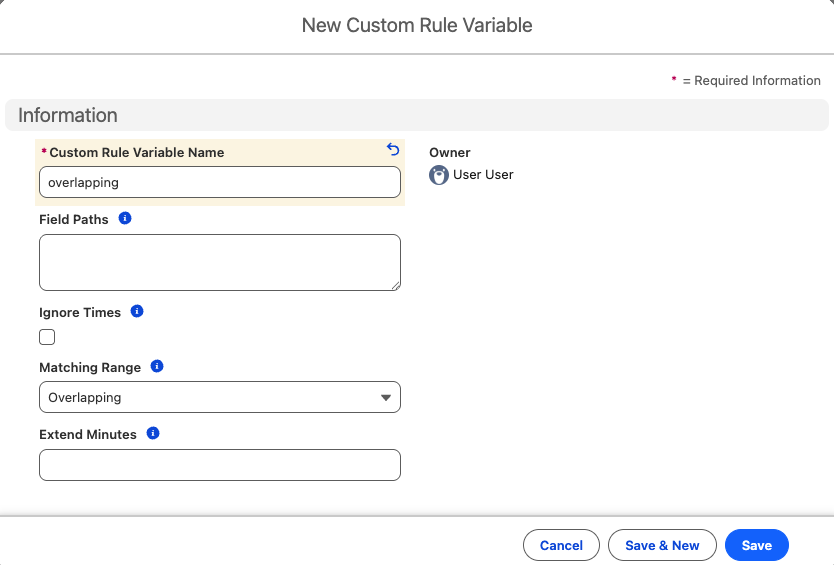
If, for example, you want all of the reservations that overlap with the same parent resource as the reservation being checked, Field Paths would be B25__Resource__r.B25__Parent__c
If you have a large number of reservations, it is recommended that all the field paths specified here are indexed in some way, either by being lookups, external IDs, or custom indexes. Otherwise, there is a risk of running into a Non-Selective Query Error.
Using the custom variable in a rule
To use the custom variable, you can reference it in a rule the same way you would overlappingReservations. So a rule that uses a custom variable overlappingTitles that looks for other reservations with the same B25__Title__c field, the rule COUNT(overlappingTitles) > 0 would prevent a reservation with the same title being created at the same time.
Matching Range
By default a custom variable behaves like overlappingReservations: only reservations that overlap in time with the reservation being checked are included. The Matching Range field lets you widen that window.
|
Matching Range |
Which reservations are included |
|---|---|
|
Overlapping (default) |
Reservations whose times overlap the reservation being checked. Can be widened with Extend Minutes. |
|
Same Day |
All matching reservations on the same calendar day. |
|
Same Week |
All matching reservations in the same calendar week. |
|
Same Month |
All matching reservations in the same calendar month. |
|
Any Time |
All matching reservations, regardless of time. |
As an example, if you want to stop a staff member from being booked more than three times in a week, you would create a custom variable weeklyStaff with the path B25__Staff__c and Matching Range Same Week, and then write the rule COUNT(weeklyStaff) < 3. The variable never contains the reservation being checked, so this allows two existing reservations plus the new one.
How the calendar ranges are determined
-
Days, weeks and months are calendar buckets in the reservation's own timezone, taken from the Time Zone field on the reservation. If that field is empty, the timezone of the current user is used.
-
The first day of the week is taken from the org's default locale rather than the locale of the user making the reservation, so Same Week means the same thing for everyone in the org.
-
A reservation that crosses a bucket boundary belongs to every bucket it touches. A reservation running from 22:00 to 02:00 counts on both days for Same Day. A reservation that ends exactly at local midnight does not count towards the next day.
The wider the Matching Range, the more reservations have to be queried, and Any Time puts no bound on the query at all. On large data volumes, pick the narrowest range that still expresses your rule and make sure the fields in Field Paths are indexed, as described above.
Extend Minutes
Extend Minutes widens the Overlapping window so that reservations that only come close to each other are matched as well. It has no effect for the other Matching Range values.
Two matching reservations are included when the gap between them is smaller than the configured number of minutes. With Extend Minutes set to 30, a reservation that starts 15 minutes after another one ends is matched, while a reservation that starts 45 minutes after it ends is not.
As an example, if you want all reservations on the same resource to be at least an hour apart, you would create a custom variable spacedResource with the path B25__Resource__c, Matching Range Overlapping and Extend Minutes 60, and then write the rule COUNT(spacedResource) == 0.
Ignore Times
The Ignore Times checkbox predates Matching Range and does the same thing as setting Matching Range to Any Time. Custom variables that use it keep working exactly as before, but for new variables it is better to use Matching Range. Note that if Matching Range is set to Same Day, Same Week or Same Month, the Ignore Times checkbox is ignored.